
Power Supply
What power supply does the Dub Siren use?
All Dub Siren units operate on 9V DC, Center Positive, 500 mA or higher, with a 2.1 mm barrel connector.
Polarity
The unit is center positive. The polarity symbol on the unit looks like this:

Make sure the “+” goes to the center pin and the sleeve is connected to ground.
Is the unit protected against reverse wiring?
Yes. We have implemented reverse-polarity protection to help prevent damage if the power supply is accidentally connected backwards. However, always double-check the polarity before connecting.
Can I use a different voltage?
Some units can operate at voltages higher or lower than 9V, but the Tone and behaviour may change at non-standard voltages. If you wish to use a different voltage, please contact us first for guidance to ensure safe operation.
Can I use an Arduino Uno 9V power supply?
Yes. Many customers successfully use the standard Arduino Uno 9V power supply, which meets the required specifications.
Can I power the Dub Siren with a battery?
Yes. All desktop Dub Siren models support battery operation. To install a battery, remove the four screws on the underside of the enclosure and insert a 9V battery.
How can I tell if the battery or power supply is low?
The Echo/feedback function is usually the first feature to degrade when the battery is running flat or the power supply is insufficient. If the echo becomes weak, inconsistent, or stops working, check the battery or power supply.
Output & Connectivity
What type of output connector does the Dub Siren use?
- Most units: RCA (phono) connectors
- Rackmount units: Mono 6.35 mm (1/4″) jack connectors
Can I connect the Dub Siren directly to a mixer?
Yes. The unit outputs a mono unbalanced signal suitable for line-level inputs on mixers, DJ mixers, or audio interfaces. Some older mixers label the line inputs as CD, which is also fine.
Avoid connecting directly to mic-level or record player inputs, as the signal will be too strong and may distort.
How do I connect an RCA output to a jack input?
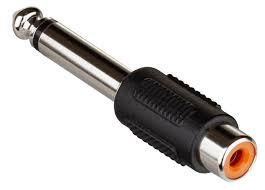
Use a standard RCA-to-1/4″ jack converter on a mono RCA cable. This method works reliably and normally does not cause signal issues.
Can I plug headphones directly into the Dub Siren?
No. The output is not designed to drive headphones. Always use a mixer or interface.
Why is my output very low or not working?
A common issue occurs when the Dub Siren’s unbalanced output (RCA or jack) is connected to a balanced input on a mixer or audio interface (via jack or XLR). This can cancel the signal, resulting in very low or no output.
Solutions:
- Use a mono jack when connecting to balanced inputs.
- For XLR connections, ensure pin 3 is grounded.
No DI box is necessary in most cases.
Sound & Mode Behavior
Why do the Tone and Siren buttons only work in certain modes?
The Tone and Siren buttons set and reset the internal ramp generator, but they only function under specific conditions:
- Mode 1 or Mode 4
- Beat = OFF
- Trigger = ON
Outside these settings, the Tone button may not produce sound, and the Siren button can override the Beat function. This ensures the unit behaves like a classic 1970s dub siren.
What sound does the Tone button produce?
In the correct mode, the buttons set and reset the internal ramp generator, producing a rising or falling tone similar to the classic “warrior charge” from the Jah Shaka scene in Babylon.
Why does the Beat function behave differently depending on the mode?
Some modes prioritize the Siren trigger over the Beat function, reflecting authentic vintage dub siren behavior.
Why does the pitch drift slightly?
Slight pitch changes can occur due to the analog circuitry, temperature, or supply voltage variations.
- Low battery voltage or insufficient power supply can cause the Tone or Echo to slow down or become inconsistent.
- Higher or lower than recommended voltages can also slightly change the sound character.
This behavior is normal for vintage-style analog dub sirens and contributes to their authentic sound.
Using Effects
Can I use delay or reverb with the Dub Siren?
Yes. The Dub Siren works well with tape echoes, digital delays, spring reverbs, or other effects chains. Connect the unit to a mixer channel and apply effects as desired.
Can I sync the siren to tempo?
No. These units follow traditional dub siren behavior and do not include tempo-synchronization features.
Operation Tips
Do I need to hold the trigger button?
Yes. For NJD-style Dub Sirens, the trigger button must be active for the unit to operate. It can be in either momentary or latched mode, but if the trigger is not active, no functions will work.
Why is the output louder in some modes?
Different modes use different waveforms and modulation patterns, which affect perceived loudness. Adjust your mixer gain as needed.
Troubleshooting
The siren powers on but makes no sound. What should I check?
- Verify the power supply is 9V DC Center Positive.
- Ensure the volume knob is above zero.
- Confirm you are in a mode using the Trigger function correctly.
- Check the wiring – most issues are caused by incorrect or faulty connections on the customer’s side.
The sound is distorted. Is the unit faulty?
Not necessarily. Analog sirens intentionally create strong, sharp waveforms. Reduce mixer gain to check if distortion is normal.
The unit hums when powered. What should I do?
Hum is often caused by low-quality adapters. Using a regulated 9V DC supply usually resolves this.
Tip: Many customers find it easier and cheaper to try a 9V battery first. Batteries are naturally well-regulated and often eliminate hum immediately.
Warranty & Repairs
What is the warranty period?
All Dub Siren units include a 1-year warranty covering manufacturing defects and failures under normal use. Repairs or replacement will be provided depending on the issue.
Do you offer repairs or replacement parts?
Yes. Switches, knobs, jacks, and certain internal components can be replaced. Contact support for availability.
Usage Guidance
How do I create the classic Jah Shaka “warrior charge” sound?
- Set the Dub Siren to Mode 1 or Mode 4.
- Make sure Beat = OFF.
- Ensure the Trigger is active (momentary or latched).
- Press the Tone and Siren buttons while toggling the Pitch knob.
In these modes, toggling the Pitch knob while pressing the Tone/Siren buttons creates stepped pitch changes during the rising or falling ramp, producing the dramatic “warrior charge” effect famously heard in Jah Shaka’s Babylon film ending scene. This is achieved via the analog ramp generator, giving the authentic vintage dub siren sound.
How do I create the classic “wheel up signal” sound?
- Set the Dub Siren to Mode 3.
- Set the Pitch knob to position 3.
- Set the Speed to 3.
This combination produces the characteristic “wheel up signal” tone, originally featured in the 1994 Jungle track by DJ Gunshot. The sample has since been widely used in Garage and House music.
Is the unit safe on large sound system rigs?
Yes. The Dub Siren outputs a controlled mono signal suitable for preamps, crossovers, and mixing boards used in professional sound system setups.
What cables do I need?
- Standard units: Mono RCA cable
- Rackmount units: Mono 1/4″ TS jack
Always use mono connections to ensure proper output levels.